Findings & checks · 0 flagged
Every scanned point with the score it earned and what moved between them.
First recorded scan — no prior version to compare against.
The primary manifest — the file an agent reads to learn what this artifact does.
verging.ai Agent Skills
AI-powered media processing and AI service skills for AI coding agents.
Demo
Face Swap
 ▶️ Click to watch demo video
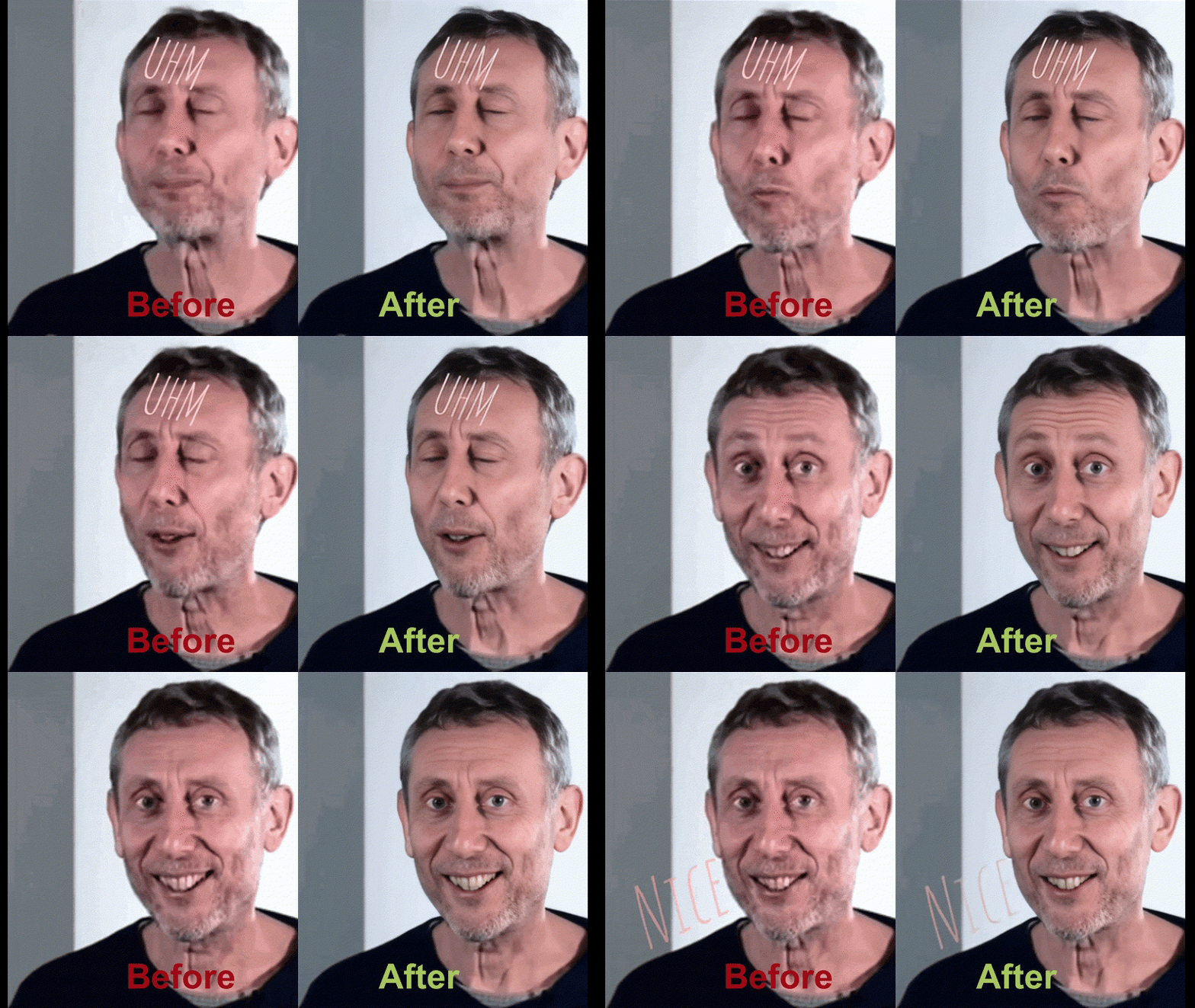
Video Enhancement
Features
Face Swap
AI-powered face swap service - Use verging.ai directly from command line.
- Support local video files and images
- Support remote video URLs (YouTube, Bilibili, etc.)
- Support remote image URLs
- Auto-download remote resources
- Real-time progress tracking
- Video trimming (specify start/end time)
Background Removal (background-remover)
AI one-click background removal to generate transparent PNG images.
- Perfect for: E-commerce product photos, portrait background removal, design materials
- Support local images (JPG, PNG, WebP)
- Support remote image URLs
- Auto-download remote resources
- Real-time progress tracking
- Maximum file size: 10MB
Video Enhancement (video-enhancement)
AI video enhancement to upscale resolution, denoise, and sharpen videos.
- Perfect for: Old video restoration, content creation, surveillance footage improvement
- Support 2x and 4x upscale
- Support local video files (MP4, MOV, AVI, MKV, WebM)
- Support remote video URLs (YouTube, Bilibili, etc.)
- Auto-download remote resources
- Real-time progress tracking
- Video trimming (specify start/end time)
- Maximum video duration: 30 seconds
Chat (chat)
AI chat completion proxy - Access GPT-4o and other LLMs.
- Support streaming and non-streaming modes
- Multi-turn conversation
- Token-based post-deduct billing
Text-to-Speech (tts)
AI text-to-speech - Convert text to natural speech audio.
- 6 voices: alloy, echo, fable, onyx, nova, shimmer
- Adjustable speed (0.25x - 4.0x)
- Multiple formats: mp3, opus, aac, flac
- Maximum text: 4096 characters
Speech-to-Text (stt)
AI speech-to-text - Transcribe audio files to text.
- Supports mp3, mp4, wav, webm, m4a and more
- Auto language detection
- Maximum file size: 25 MB
Image Generation (imagegen)
AI image generation - Generate images from text prompts.
- Models: gpt-image-1, dall-e-3
- Multiple sizes and quality levels
- Batch generation up to 4 images
Vision Analysis (vision)
AI vision analysis - Analyze images and answer questions.
- Supports image URL and local file upload
- GPT-4o powered visual understanding
- Maximum image size: 20 MB
Installation
# Install all skills
npx skills add verging-ai/agent-skills

# Or install individually
npx skills add verging-ai/agent-skills --skill faceswap
npx skills add verging-ai/agent-skills --skill background-remover
npx skills add verging-ai/agent-skills --skill video-enhancement
npx skills add verging-ai/agent-skills --skill chat
npx skills add verging-ai/agent-skills --skill tts
npx skills add verging-ai/agent-skills --skill stt
npx skills add verging-ai/agent-skills --skill imagegen
npx skills add verging-ai/agent-skills --skill vision
Usage
Face Swap
# Basic usage
/faceswap --video ./input.mp4 --face ./my-face.jpg

# Specify time range
/faceswap -v ./video.mp4 -f ./face.jpg --start 5 --end 30

# Use remote video
/faceswap -v "https://youtube.com/watch?v=xxx" -f ./face.jpg --hd

# Auto download result
/faceswap -v ./video.mp4 -f ./face.jpg --download
Face Swap Options
| Option | Short | Description | Default |
|---|---|---|---|
| --video | -v | Target video file or URL | Required |
| --face | -f | Face image file or URL | Required |
| --start | -s | Start time in seconds | 0 |
| --end | -e | End time in seconds | Video duration |
| --hd | -h | HD mode (3 credits/sec vs 1 credit/sec) | false |
| --api-key | -k | Your API Key | VERGING_API_KEY env |
| --output | -o | Output directory | Current dir |
| --download | -d | Auto download result | false |
Background Removal
# Basic usage
/background-removal --image ./photo.jpg

# Use remote image
/background-removal -i https://example.com/photo.jpg

# Auto download result
/background-removal -i ./photo.jpg --download
Background Removal Options
| Option | Short | Description | Default |
|---|---|---|---|
| --image | -i | Target image file or URL | Required |
| --api-key | -k | Your API Key | VERGING_API_KEY env |
| --output | -o | Output directory | Current dir |
| --download | -d | Auto download result | false |
Video Enhancement
# Basic usage
/video-enhancement --video ./old-video.mp4

# HD mode
/video-enhancement -v ./video.mp4 --hd

# With time range
/video-enhancement -v ./video.mp4 --hd --start 5 --end 15

# Use remote video
/video-enhancement -v "https://youtube.com/watch?v=xxx" --download

# Auto download result
/video-enhancement -v ./video.mp4 --download
Video Enhancement Options
| Option | Short | Description | Default |
|---|---|---|---|
| --video | -v | Target video file or URL | Required |
| --hd | -h | HD mode (3 credits/sec vs 1 credit/sec) | false |
| --start | -ss | Start time in seconds | 0 |
| --end | -e | End time in seconds | Video duration |
| --api-key | -k | Your API Key | VERGING_API_KEY env |
| --output | -o | Output directory | Current dir |
| --download | -d | Auto download result | false |
Chat
# Simple question
/chat -m "Explain Docker in 3 sentences"

# Multi-turn with streaming
/chat --messages '[{"role":"system","content":"You are a Python expert"},{"role":"user","content":"How to read CSV?"}]' --stream
Chat Options
| Option | Short | Description | Default |
|---|---|---|---|
| --message | -m | Single user message | Required (or --messages) |
| --messages | -M | Full messages JSON array | Required (or --message) |
| --model | LLM model | gpt-4o | |
| --temperature | -t | Sampling temperature (0-2) | Provider default |
| --max-tokens | Max response tokens | Provider default | |
| --stream | -s | Enable streaming | false |
| --api-key | -k | Your API Key | VERGING_API_KEY env |
Text-to-Speech
# Basic usage
/tts -t "Hello, welcome to verging.ai"

# Choose voice and save to file
/tts --text "你好世界" --voice nova --output ./speech.mp3
TTS Options
| Option | Short | Description | Default |
|---|---|---|---|
| --text | -t | Text to convert (max 4096 chars) | Required |
| --voice | -v | alloy, echo, fable, onyx, nova, shimmer | alloy |
| --model | tts-1, tts-1-hd | tts-1-hd | |
| --format | -f | mp3, opus, aac, flac | mp3 |
| --speed | -s | 0.25 to 4.0 | 1.0 |
| --output | -o | Save audio file to path | (URL only) |
| --api-key | -k | Your API Key | VERGING_API_KEY env |
Speech-to-Text
# Basic usage
/stt -f ./meeting.mp3

# With language hint
/stt --file ./interview.wav --language zh
STT Options
| Option | Short | Description | Default |
|---|---|---|---|
| --file | -f | Audio file path | Required |
| --model | STT model | whisper-1 | |
| --language | -l | Language hint (ISO 639-1) | Auto-detect |
| --format | json, text, srt, vtt | json | |
| --api-key | -k | Your API Key | VERGING_API_KEY env |
Image Generation
# Basic usage
/imagegen -p "a cat sitting on a rainbow"

# High quality, multiple images
/imagegen --prompt "product photo of red sneaker" --quality high --n 2 --output ./images/
Image Generation Options
| Option | Short | Description | Default |
|---|---|---|---|
| --prompt | -p | Text description | Required |
| --model | gpt-image-1, dall-e-3 | gpt-image-1 | |
| --size | -s | 1024x1024, 1024x1536, etc. | 1024x1024 |
| --quality | -q | auto, low, medium, high | auto |
| --n | -n | Number of images (1-4) | 1 |
| --output | -o | Save images to directory | (URL only) |
| --api-key | -k | Your API Key | VERGING_API_KEY env |
Vision Analysis
# Analyze local image
/vision -i ./screenshot.png -p "What errors are shown?"

# Analyze remote image
/vision --image "https://example.com/chart.png" --prompt "Summarize this chart"
Vision Options
| Option | Short | Description | Default |
|---|---|---|---|
| --image | -i | Image file path or URL | Required |
| --prompt | -p | Question about the image | Required |
| --model | Vision model | gpt-4o | |
| --max-tokens | Max response tokens | 1024 | |
| --api-key | -k | Your API Key | VERGING_API_KEY env |
Environment Variables
# Set your API Key
export VERGING_API_KEY="your_api_key_here"

# Optional: Set API URL (default: https://verging.ai/api/v1)
export VERGING_API_URL="https://verging.ai/api/v1"
Get API Key
- Visit https://verging.ai
- Register/Login
- Click your username in the top right corner
- Select API Keys from the dropdown menu
- Create a new API Key
API Keys Location
Credits
Face Swap
- Normal mode: 1 credit/second
- HD mode: 3 credits/second
Background Removal
- 1 credit per image
Video Enhancement
- Normal mode: 1 credit/second
- HD mode: 3 credits/second
Chat
- Post-deduct billing based on token usage
Text-to-Speech
- Pre-deduct billing based on character count
Speech-to-Text
- Pre-deduct billing based on audio duration
Image Generation
- Pre-deduct billing based on model, size, quality, and count
Vision Analysis
- Post-deduct billing: 2 base credits + token cost
License
MIT