Findings & checks · 0 flagged
Every scanned point with the score it earned and what moved between them.
First recorded scan — no prior version to compare against.
The primary manifest — the file an agent reads to learn what this artifact does.
Mailforce
Mailforce is the safe way to let AI agents use your email without handing them your whole inbox.
Playground In 60 Seconds
The fastest way to feel what Mailforce is for:
cp .env.example .env
# add OPENAI_API_KEY to .env

npm install
npm run build
npm link

mailforce setup
mailforce agents create support-agent --description "Customer support bot"
mailforce playground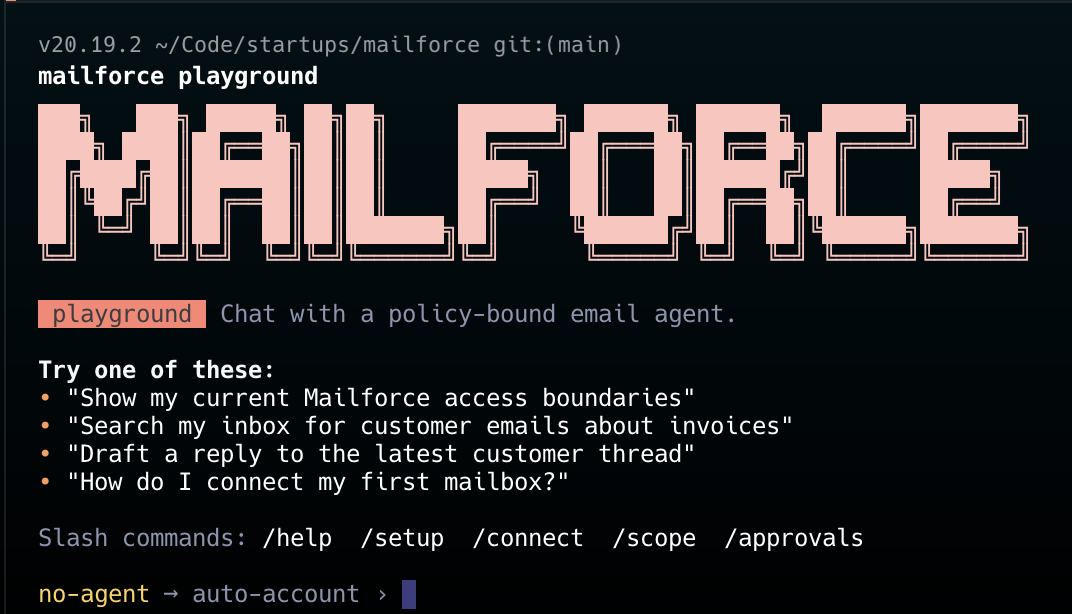
Inside the playground:
/connect
/agent support-agent
"Show me my Mailforce boundaries."
"Search for the latest customer thread about invoice issues."
"Draft a safe reply but do not send it."
The point is immediate: you can chat with an agent, let it inspect or act on email workflows, and still keep Mailforce in charge of which inboxes, recipients, and send paths are allowed.
Most people want agents to help with email, but they stop at the same point:
- "I want the agent to help, but I do not want it reading everything."
- "I want it to email customers, but not random people."
- "I want it to draft or reply, but not send without me."
- "I do not want one bad prompt to turn into a reply-all disaster."
Mailforce exists for that exact moment.
It gives your agents useful email access with smart restrictions:
- which accounts they can use
- who they can contact
- whether they can read, draft, or send
- whether a human approval is required before sending
- whether they connect locally through
stdioor remotely through HTTP with an API key
Mailforce is designed to become the default trust layer between AI agents and email providers.
What It Does
- Connects mailbox accounts and stores encrypted provider credentials locally.
- Binds permissions to named agents, not to whatever the model claims it is.
- Lets you give different agents different access to different inboxes.
- Restricts who an agent can contact using allowlists or blocklists.
- Separates
READ,WRITE, andREAD_WRITEbehavior. - Lets you require approval before any real send happens.
- Exposes the same guarded actions through local
stdioMCP and remote HTTP MCP.
In practice, that means you can do things like:
- Give a support agent access to read customer threads and reply only to
*@customer.com. - Let a research agent search
.eduemails, but not send anything. - Let a remote coding agent create drafts, while requiring human approval before sending.
- Let an agent read automated confirmation emails or one-time codes without giving it broad inbox access.
- Give agents access to email workflows without exposing raw mailbox credentials or unrestricted account access.
- Run multiple agents against the same mailbox with different limits, for example one read-only agent and one write-enabled agent with approval required.
Why Mailforce Instead of Raw OAuth
OAuth usually gives the connected app broad mailbox access. Once the token exists, the real safety decisions are mostly outside your control.
Mailforce adds a policy layer in front of that token. The agent does not talk to Gmail directly. It talks to Mailforce, and Mailforce decides whether the action is allowed.
That means the question changes from:
"Should this agent have my Gmail token?"
to:
"What exactly should this agent be allowed to do with this account?"
Scopes and Access Levels
Mailforce splits email access into two simple concepts:
Scope: Who the agent can interact with
EVERYONE: the agent can contact any address.ONLY: the agent can contact only a whitelist such as*@customer.comor[email protected].EVERYONE_EXCEPT: the agent can contact everyone except a blacklist such as*@competitor.com.
Examples:
--allow "EVERYONE"
--allow "ONLY *@customer.com, [email protected]"
--allow "EVERYONE_EXCEPT *@competitor.com"
Access level: What the agent can do
READ: list, search, and read emails.WRITE: draft, reply, or send emails.READ_WRITE: both read and write capabilities.
You can also require approval for write actions:
--permission READ_WRITE --require-confirm trueThat means the agent can do useful work, but the final send still waits for you.
How This Differs From Gmail Delegate
Gmail delegation is built for giving another human broad access to an inbox.
Mailforce is different:
- Gmail delegate is account-level trust. Mailforce is policy-level trust.
- Gmail delegate does not know which AI agent is acting. Mailforce binds every request to a named agent.
- Gmail delegate does not express rules like
ONLY *@customer.com. Mailforce does. - Gmail delegate does not separate local MCP and remote MCP identities. Mailforce does.
- Gmail delegate does not add a programmable approval queue in front of sends. Mailforce does.
Put simply:
Gmail delegate says "this actor can use the inbox."
Mailforce says "this specific agent can use this inbox in these ways, with these limits."
Current v1 Scope
- Gmail provider implemented first.
- Outlook reserved behind the same provider adapter boundary.
- Approval queue for write actions.
- API keys for remote MCP clients.
Install
cp .env.example .env
# set OPENAI_API_KEY in .env

npm install
npm run build
npm link
If you do not want to run npm link, use node dist/cli/index.js ... instead of mailforce ....
Run the first-time setup wizard any time with:
mailforce setupQuick Start
This is the shortest path to a useful interactive setup:
mailforce setup

mailforce agents create support-agent --description "Customer support bot"

mailforce accounts connect gmail "Work Email" \
  --email [email protected] \
  --hosted

mailforce policies set support-agent \
  --name support-policy \
  --accounts "Work Email" \
  --allow "ONLY *@customer.com" \
  --permission READ_WRITE \
  --require-confirm true

mailforce playground
Once the playground opens, you can explore with normal chat plus slash commands like /help, /scope, /approvals, /account, and /agent.
Common Commands
mailforce setup
mailforce playground

mailforce agents create support-agent --description "Customer support bot"

mailforce accounts connect gmail "Work Email" \
  --email [email protected] \
  --hosted

mailforce accounts connect gmail "Work Email" \
  --email [email protected] \
  --client-id "$GOOGLE_CLIENT_ID" \
  --client-secret "$GOOGLE_CLIENT_SECRET"

mailforce policies set support-agent \
  --name support-policy \
  --accounts "Work Email" \
  --allow "ONLY *@customer.com" \
  --permission READ_WRITE \
  --require-confirm true

mailforce keys create support-agent --name claude-remote
The first accounts connect example is the easy browser-auth path. The second is the advanced bring-your-own Google OAuth flow.
Playground Highlights
- Color-rich chat interface built into
mailforce playground. - OpenAI-backed assistant configured from
.env. - Slash commands and tab completion for fast context switching.
- Uses the same Mailforce tool layer as MCP clients, so policy enforcement stays consistent.
- Makes approvals, scope, and tool activity visible during the session.
Remote MCP HTTP Setup
The built-in playground is the easiest way to experiment. Use the HTTP MCP server when you want other local or remote agents to call Mailforce directly.
Start the Mailforce HTTP MCP server:
mailforce mcp serve-http --port 8787Create an API key for the agent that should use Mailforce:
mailforce keys create support-agent --name claude-remoteThen configure your MCP client to call the HTTP endpoint at http://127.0.0.1:8787/mcp with a bearer token.
Claude Code example:
claude mcp add --transport http mailforce-remote http://127.0.0.1:8787/mcp \
  --header "Authorization: Bearer YOUR_AGENT_KEY"
Project .mcp.json example:
{
  "mcpServers": {
    "mailforce-remote": {
      "type": "http",
      "url": "http://127.0.0.1:8787/mcp",
      "headers": {
        "Authorization": "Bearer ${MAILFORCE_AGENT_KEY}"
      }
    }
  }
}
The HTTP server is the remote MCP endpoint for cloud or non-local agents. Mailforce uses the bearer key to resolve the agent identity and enforce that agent's access policy.
Why This Can Become A Standard Layer
The biggest blocker to useful agent workflows is not model intelligence. It is permissions.
Mailforce is opinionated about that:
- local-first control plane
- provider-agnostic policy model
- MCP-native integration path
- explicit agent identity
- human approval for high-risk actions
If that layer becomes standard, developers get one mental model for safe email automation across Gmail, Outlook, local agents, and remote agents.
Easier Authentication
Mailforce now has two connection paths:
- Hosted browser auth:
mailforce accounts connect gmail "Work Email" --email [email protected] --hosted - Advanced BYO OAuth: pass
--client-idand--client-secretdirectly
The hosted path is designed for the simple "press Enter, browser opens, come back connected" experience. The broker URL is configurable for self-hosted or staged environments through the Mailforce playground config.
See docs/hosted-auth.md for the broker contract the CLI expects.
Contributing
Mailforce should be easy to extend.
Contributions are especially welcome in these areas:
- new email providers
- stronger policy controls
- better approval UX
- better MCP client integration and docs
- production hardening for remote deployments
If you want to contribute:
- Fork the repo and create a branch.
- Install dependencies with
npm install. - Run
npm testandnpm run checkbefore opening a PR. - Keep provider-specific logic behind the provider adapter boundary instead of leaking it into the policy engine.
- Add tests for policy behavior and provider behavior whenever you change them.
Adding A Provider
Mailforce is built so new providers plug into the shared policy and MCP layers.
Start by reading Provider.md, which explains:
- the provider contract
- where new provider code should live
- how credentials should be stored
- what behaviors to test
- how to keep provider-specific behavior out of the core trust model
Providers that would be especially valuable next:
- Outlook
- Proton Mail
- Zoho Mail
- Yahoo Mail
MCP Tools
get_access_infolist_emailssearch_emailsget_emailcreate_draftsend_emailreply_to_threadlist_pending_approvalsget_action_status
Integration Guide
See docs/integrations.md for Claude Code and Cursor setup examples.