Findings & checks · 0 flagged
Every scanned point with the score it earned and what moved between them.
First recorded scan — no prior version to compare against.
The primary manifest — the file an agent reads to learn what this artifact does.
lecroy-mcp
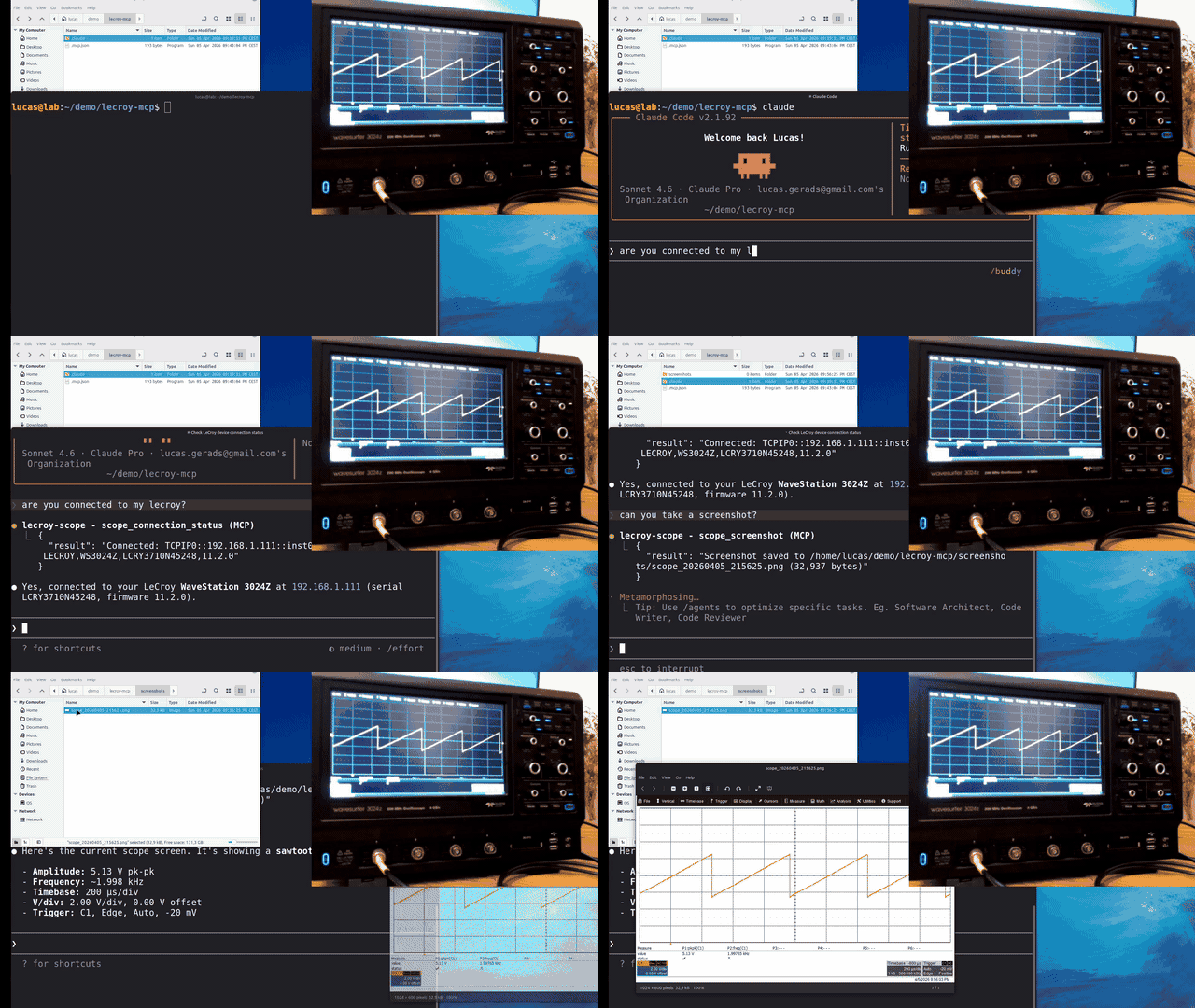
MCP server for controlling LeCroy oscilloscopes via SCPI over LAN (VXI-11) or USB.
Requirements
- uv installed
- A LeCroy oscilloscope connected over LAN or USB
MCP configuration
Add to your MCP client config (e.g. Claude Code's .mcp.json):
{
  "mcpServers": {
    "lecroy-scope": {
      "type": "stdio",
      "command": "uvx",
      "args": ["lecroy-mcp"]
    }
  }
}
uvx will automatically download and run the server — no manual installation needed.
Oscilloscope setup (LAN / VXI-11)
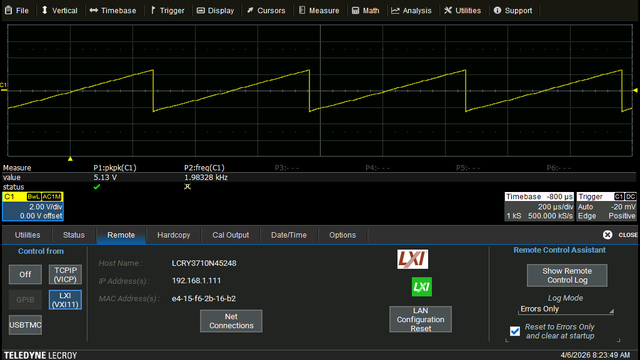
This server communicates over the standard VXI-11 protocol. Before connecting, enable it on the scope:
- On the scope, go to Utilities → Utilities Setup ... → Remote
- In the Control from section, enable LXI (VXI11)
- Note the IP Address shown — you will need it for the connection string
The scope's IP can be assigned via DHCP or configured statically under Utilities → Utility → Remote → Net Connections.
Note: The TCPIP (VICP) option shown in the same panel uses LeCroy's proprietary protocol and is currently not supported by this server. Only LXI (VXI11) is required.
Connection options
Option 1 — Manual connection
Copy the MCP client config from above as-is and connect from within the Claude session:
scope_scan— auto-detect LeCroy scopes on the local networkscope_list_resources— list all VISA resources (LAN + USB)scope_connect("TCPIP0::192.168.1.111::inst0::INSTR")— connect directly
Optionally set LECROY_SUBNET to hint the scan range:
{
  "mcpServers": {
    "lecroy-scope": {
      "type": "stdio",
      "command": "uvx",
      "args": ["lecroy-mcp"],
      "env": {
        "LECROY_SUBNET": "192.168.1.0/24"
      }
    }
  }
}
Option 2 — Pre-configure the IP address (recommended for LAN)
Set LECROY_HOST in the env block and the server auto-connects on startup:
{
  "mcpServers": {
    "lecroy-scope": {
      ...
      "env": {
        "LECROY_HOST": "192.168.1.111"
      }
    }
  }
}
Option 3 — Pre-configure a full resource string (LAN or USB)
Use LECROY_RESOURCE for full control, including USB connections:
{
  "mcpServers": {
    "lecroy-scope": {
      ...
      "env": {
        "LECROY_RESOURCE": "USB0::0x05FF::0x1023::12345::INSTR"
      }
    }
  }
}
Usage
Once connected, you have tools for:
- Channel setup (scale, offset, coupling, bandwidth limit)
- Trigger configuration (mode, source, level, edge)
- Timebase and memory depth
- Automated measurements (PKPK, FREQ, RMS, RISE, DUTY, etc.)
- Waveform capture (JSON or CSV)
- Screenshots
- Math functions (FFT, INTG, DIFF, etc.)
- WaveSource built-in generator (WaveSurfer 3000Z and similar)
Supported models
The server detects the connected model and adjusts commands accordingly. Profiles are included for:
- WaveSurfer 3000Z / 4000HD
- HDO4000A / HDO6000B / HDO8000A
- WaveRunner 6000 / 8000
- WavePro HD
- MDA800A, SDA
Unknown models fall back to conservative defaults.
Manual installation
If you prefer not to use uvx:
pip install lecroy-mcpThen use lecroy-mcp as the command in your MCP config instead of uvx lecroy-mcp.
Updating
With uvx, use the @latest tag to force the newest version:
uvx lecroy-mcp@latestOr update the args in your .mcp.json to always pull the latest:
"args": ["lecroy-mcp@latest"]With pip:
pip install --upgrade lecroy-mcpNotes
- Requires
pyvisa-pybackend — NI-VISA is currently not supported (breaks screenshot capture) - All VISA access is serialized via a threading lock; parallel MCP tool calls are safe
Troubleshooting
Diagnostic messages not appearing in MCP logs
If you are not seeing server log output (e.g. auto-connect status or errors) in your MCP client's log viewer, add PYTHONUNBUFFERED to the env block:
"env": {
  "PYTHONUNBUFFERED": "1"
}
This disables Python's output buffering so log messages are flushed immediately. It is not required for normal operation.
Tested with
| Component | Details |
|---|---|
| Oscilloscope | Teledyne LeCroy WaveSurfer 3024Z |
| Operating system | Windows 10, Windows 11, Linux Mint |
| MCP client | Claude Code |
This server should also work with other MCP-compatible clients such as OpenAI Codex and Google Gemini Code Assist, and on other operating systems such as macOS. Reports and contributions for additional configurations are welcome.
Disclaimer
Teledyne LeCroy and LeCroy are registered trademarks of Teledyne LeCroy, Inc. This project is an independent open-source tool and is not affiliated with, endorsed by, or sponsored by Teledyne LeCroy, Inc. All product and company names are trademarks or registered trademarks of their respective holders.